




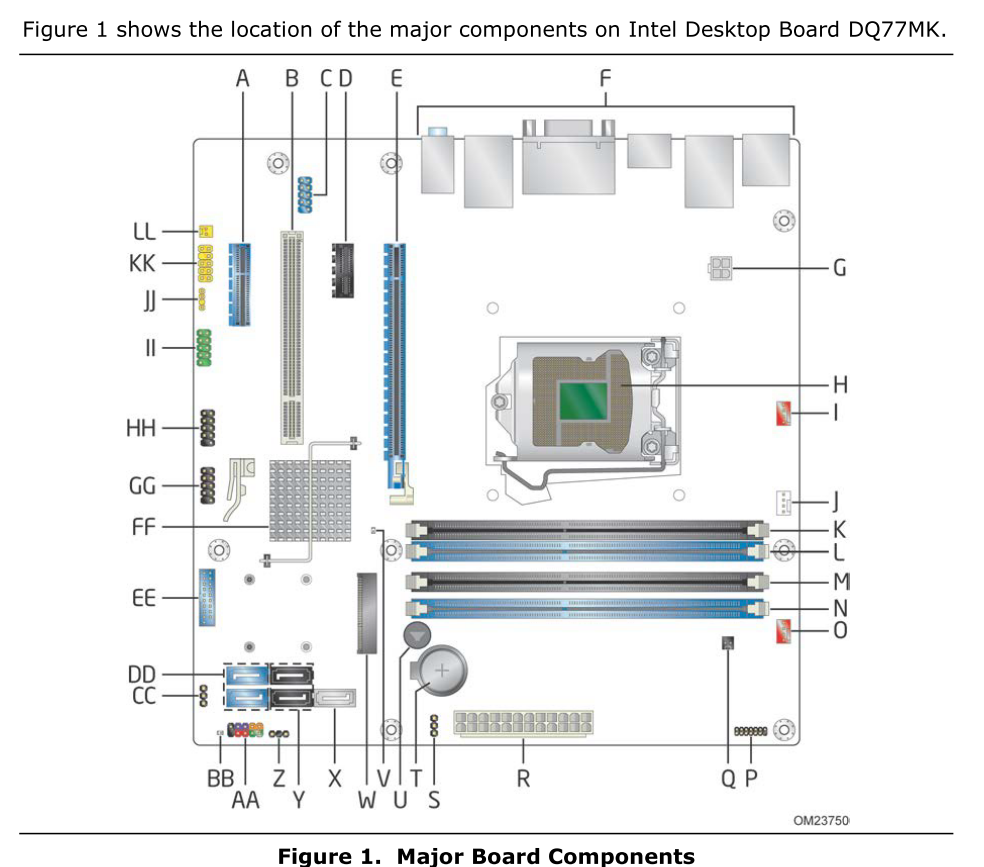
Documentação completa para a placa-mãe Intel DQ77MK para desktops mATX.
A Intel removeu essas informações de seu site (fim do suporte).
Arquivos no arquivo:
- Manual (versão de julho de 2013, código G54941-004, arquivo baixado em abril de 2018).
- Lista de CPUs suportadas (sem versão, arquivo baixado em abril de 2018).
- Leia o arquivo readme da atualização da BIOS - usando a ferramenta de flash integrada, usando o flasher DOS iflash2, usando o modo de recuperação (sem versão, arquivo baixado em 2019-04).
Usei o Google Tradutor para traduzir este texto para português (BR), podem haver imprecisões.
Todo o texto abaixo está em inglês:
===========================================
Documentation set for Intel DQ77MK desktop mATX motherboard.
Intel has removed this information from their website (end of support).
Files in archive:
- Manual (version from July 2013, p/n G54941-004, file downloaded 2018-04).
- CPU support list (no version, file downloaded 2018-04).
- BIOS update readme - using integrated flash tool, using iflash2 DOS flasher, using recovery mode (no version, file downloaded 2019-04).
===========================================
Manual Contents:
Revision History
Board Identification Information
Specification Changes or Clarifications
Errata
Preface
Intended Audience
What This Document Contains
Typographical Conventions
1 Product Description
1.1 Overview
1.1.1 Feature Summary
1.1.2 Board Layout
1.1.3 Block Diagram
1.2 Online Support
1.3 Processor
1.3.1 Graphics Subsystem
1.4 System Memory
1.4.1 Memory Configurations
1.5 Intel® Q77 Express Chipset
1.5.1 Direct Media Interface (DMI)
1.5.2 Display Interfaces
1.5.3 USB
1.5.4 SATA Interfaces
1.6 Real-Time Clock Subsystem
1.7 Legacy I/O Controller
1.8 Audio Subsystem
1.8.1 Audio Subsystem Software
1.8.2 Audio Connectors and Headers
1.9 LAN Subsystem
1.9.1 Intel® 82579LM Gigabit Ethernet Controller and Intel® 82574L Gigabit Ethernet Controller
1.9.2 LAN Subsystem Software
1.9.3 RJ-45 LAN Connectors with Integrated LEDs
1.10 Hardware Management Subsystem
1.10.1 Hardware Monitoring
1.10.2 Fan Monitoring
1.10.3 Chassis Intrusion and Detection
1.10.4 Thermal Monitoring
1.11 Intel® Security and Manageability Technologies
1.11.1 Intel® vPro™ Technology
1.11.2 Intel Small Business Technology
1.11.3 Intel® Management Engine (Intel® ME) Software and Drivers
1.12 Power Management
1.12.1 ACPI
1.12.2 Hardware Support
2 Technical Reference
2.1 Memory Resources
2.1.1 Addressable Memory
2.1.2 Memory Map
2.2 Connectors and Headers
2.2.1 Back Panel Connectors
2.2.2 Component-side Connectors and Headers
2.3 Jumper Block
2.4 Intel® Management Engine BIOS Extension (Intel® MEBX) Reset Header
2.5 Mechanical Considerations
2.5.1 Form Factor
2.6 Electrical Considerations
2.6.1 Power Supply Considerations
2.6.2 Power Supervisor
2.6.3 Fan Header Current Capability
2.6.4 Add-in Board Considerations
2.7 Thermal Considerations
2.8 Reliability
2.9 Environmental
3 Overview of BIOS Features
3.1 Introduction
3.2 BIOS Flash Memory Organization
3.3 Resource Configuration
3.3.1 PCI Express Autoconfiguration
3.4 System Management BIOS (SMBIOS)
3.5 Legacy USB Support
3.6 BIOS Updates
3.6.1 Language Support
3.6.2 Custom Splash Screen
3.7 BIOS Recovery
3.8 Boot Options
3.8.1 Optical Drive Boot
3.8.2 Network Boot
3.8.3 Booting Without Attached Devices
3.8.4 Changing the Default Boot Device During POST
3.9 Adjusting Boot Speed
3.9.1 Peripheral Selection and Configuration
3.9.2 BIOS Boot Optimizations
3.10 Hard Disk Drive Password Security Feature
3.11 BIOS Security Features
3.12 BIOS Performance Features
4 Error Messages and Beep Codes
4.1 Speaker
4.2 BIOS Beep Codes
4.3 Front-panel Power LED Blink Codes
4.4 BIOS Error Messages
4.5 Port 80h Power On Self Test (POST) Codes
5 Regulatory Compliance and Battery Disposal Information
5.1 Regulatory Compliance
5.1.1 Safety Standards
5.1.2 European Union Declaration of Conformity Statement
5.1.3 Product Ecology Statements
5.1.4 China RoHS
5.1.5 EMC Regulations
5.1.6 e-Standby and ErP Compliance
5.1.7 Regulatory Compliance Marks (Board Level)
5.2 Battery Disposal Information
Figures
1. Major Board Components
2. Block Diagram
3. Memory Channel and DIMM Configuration
4. Back Panel Audio Connectors
5. LAN Connectors LED Locations
6. Thermal Sensors and Fan Headers
7. Location of the Intel ME “M” State LED
8. Location of the Standby Power LED
9. Detailed System Memory Address Map
10. Back Panel Connectors
11. Component-side Connectors and Headers
12. Connection Diagram for Front Panel Header
13. Connection Diagram for Front Panel USB 2.0 Connectors
14. Location of the Jumper Block
15. Intel MEBX Reset Header
16. Board Dimensions
17. Localized High Temperature Zones
18. Intel Desktop Board DQ77MK China RoHS Material Self Declaration Table
Tables
1. Feature Summary
2. Components Shown in Figure 1
3. Supported Memory Configurations
4. DVI Port Status Conditions
5. DisplayPort Status Conditions
6. Audio Formats Supported by the DisplayPort Interface
7. Audio Jack Support
8. LAN Connector LED States
9. Intel ME “M” State LED Behavior
10. Effects of Pressing the Power Switch
11. Power States and Targeted System Power
12. Wake-up Devices and Events
13. System Memory Map
14. Component-side Connectors and Headers Shown in Figure 11
15. Serial Port Connector
16. Front Panel Audio Header for Intel HD Audio
17. Front Panel Audio Header for AC ’97 Audio
18. Front Panel USB 2.0 Connectors
19. Front Panel USB 3.0 Connector
20. IEEE 1394a Connector
21. Internal Mono Speaker Header
22. PCI Express Full-/Half-Mini Card Connector
23. SATA Connectors
24. S/PDIF Header
25. Chassis Intrusion Header
26. Processor, Front, and Rear Chassis (4-Pin) Fan Headers
27. LPC Debug Header
28. Processor Core Power Connector
29. Main Power Connector
30. Front Panel Header
31. States for a One-Color Power LED
32. States for a Two-Color Power LED
33. Alternate Front Panel Power/Sleep LED Header
34. BIOS Setup Configuration Jumper Settings
35. Intel MEBX Reset Header Signals
36. Recommended Power Supply Current Values (High Power)
37. Recommended Power Supply Current Values (Low Power)
38. Fan Header Current Capability
39. Thermal Considerations for Components
40. Tcontrol Values for Components
41. Environmental Specifications
42. BIOS Setup Program Menu Bar
43. BIOS Setup Program Function Keys
44. Acceptable Drives/Media Types for BIOS Recovery
45. Boot Device Menu Options
51. Master Key and User Hard Drive Password Functions
46. Supervisor and User Password Functions
47. BIOS Beep Codes
48. Front-panel Power LED Blink Codes
49. BIOS Error Messages
50. Port 80h POST Code Ranges
51. Port 80h POST Codes
52. Typical Port 80h POST Sequence
53. Safety Standards
54. EMC Regulations
55. Regulatory Compliance Marks
===========================================
Editado: por Игорь хбз
etiquetas, descrição
Comentários em destaque
Participe agora da conversa!
Você pode postar agora e se cadastrar mais tarde. Se você tiver uma conta, faça login para postar com sua conta.