Ir para conteúdo
View in the app

A better way to browse. Learn more.

EletrônicaBR.com

A full-screen app on your home screen with push notifications, badges and more.

To install this app on iOS and iPadOS
  1. Tap the Share icon in Safari
  2. Scroll the menu and tap Add to Home Screen.
  3. Tap Add in the top-right corner.
To install this app on Android
  1. Tap the 3-dot menu (⋮) in the top-right corner of the browser.
  2. Tap Add to Home screen or Install app.
  3. Confirm by tapping Install.

andersonsilvah

Membros
  • Registrado em

  • Última visita

  • Créditos EBR

    1
  1. Esse resistor marcado esta dando curto. Retirei ele da placa e testei, esta dando curto mais não tenho o esquema pra saber o valor dele.
  2. Já troquei a campanhia, testei os componentes responsaveis na placa mesmo não achei nenhum curto porém como não tenho manual tecnico fica mais dificil de achar o defeito. Ele toca porem muito baixo e com um pouco de ruidos no som. Alguem poderia me dar uma dica?
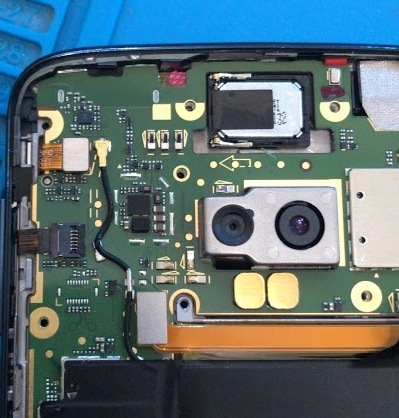
  3. Conheci o EletrônicaBR fazendo pesquisas no Google. Estudante Pretendo desenvolver habilidade de fazer reparos em placas de smartphones. Tenho 27 anos trabalho com celulares já tem 9 anos sempre fiz reparos em placas porém nunca me aprofundei nem busquei me especializar em reparos de placas. Hoje estou tentando me especializar pois sei que será um diferencial em minha assistência.

Account

Navigation

Pesquisar

Pesquisar

Configure browser push notifications

Chrome (Android)
  1. Tap the lock icon next to the address bar.
  2. Tap Permissions → Notifications.
  3. Adjust your preference.
Chrome (Desktop)
  1. Click the padlock icon in the address bar.
  2. Select Site settings.
  3. Find Notifications and adjust your preference.