


Maximiliano Femenia
Membros
-
Registrado em
-
Última visita
-
Créditos EBR
0
-
Maximiliano Femenia alterou sua foto pessoal
-
Ver archivo EUROCASE ATOM 455 - Quanta UW3 da0uw3mb6d0 Rev D - BIOS Netbook: EUROCASE ATOM 455 Processor: Intel ATOM 455 Motherboard: Quanta UW3 (da0uw3mb6d0) Rev D BIOS: Original Tested model W25Q80BV 1 MB Submitter Maximiliano Femenia Submitted 12/03/21 Categoría Otros
-
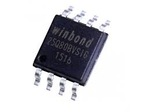 Netbook: EUROCASE ATOM 455 Processor: Intel ATOM 455 Motherboard: Quanta UW3 (da0uw3mb6d0) Rev D BIOS: Original Tested model W25Q80BV 1 MBFree
 -
Meu nome é Maximiliano Emanuel Femenia, 254 anos. 1. Descobri a ElectronicaBR em pesquisas de interesse no Google. 2. Tenho alto nível técnico e de engenharia. 3. Pretendo adquirir informações sobre reparos específicos dedicados a computadores. 4. Sou especialista em reparos técnicos eletrônicos de nível avançado, programação e testes.
