


jumnior34
Membros
-
Registrado em
-
Última visita
-
Créditos EBR
0
-
Olá, sou Tiago Pereira. Sou Profissional Liberal da área de TI. Estou à 15 anos no mercado de Suporte. Formado com Tecnólogo em Rede de Computadores, com Certificações Microsoft, iTIL e COBIT; Aqui para aprender, e colaborar. Conheci o fórum em uma pesquisa para BIOS d uma MALDIA PCWARE IPX1800G1 (affff....). Pretendo contribuir no que me for cabível para o desenvolvimento do fórum, com as várias experiências do mercado, e estudos na área d TI.
-
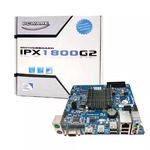 Ela serve para IPX1800G1? E como diaxo acesso a BIOS dessa Placa? Já tentei DEL, TAB, F1, F8 À F12, ESC....E nada.... Se puder dar essa força...
