Ir para conteúdo
View in the app

A better way to browse. Learn more.

EletrônicaBR.com

A full-screen app on your home screen with push notifications, badges and more.

To install this app on iOS and iPadOS
  1. Tap the Share icon in Safari
  2. Scroll the menu and tap Add to Home Screen.
  3. Tap Add in the top-right corner.
To install this app on Android
  1. Tap the 3-dot menu (⋮) in the top-right corner of the browser.
  2. Tap Add to Home screen or Install app.
  3. Confirm by tapping Install.

andreazevedo

Membros
  • Registrado em

  • Última visita

  • Créditos EBR

    0
  1. segue o link do esquema http://blob:null/81ae8643-8fe7-49f8-8cbe-793cb8e3bdd5
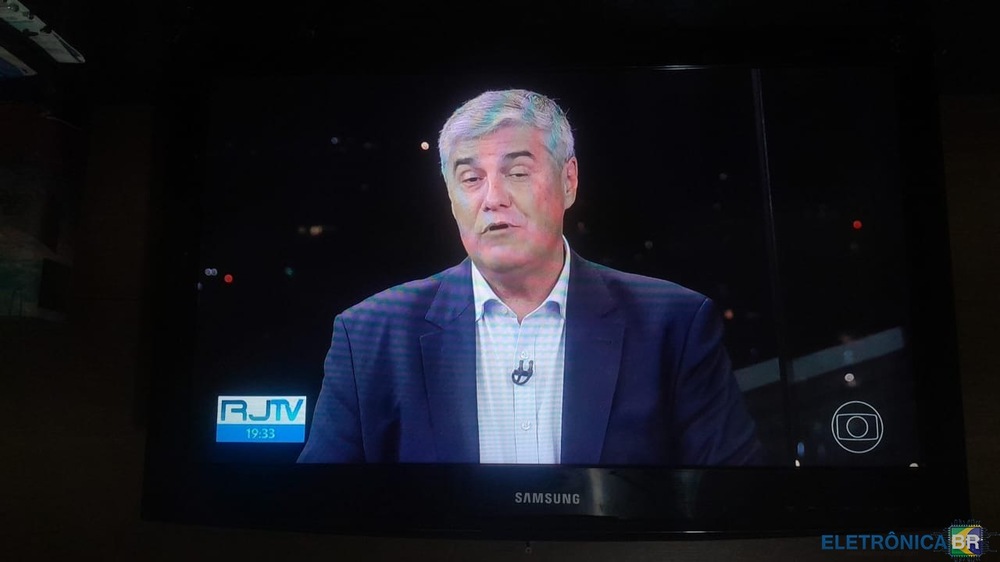
  2. Alem de ser Dj ,fiz eletronica basica em Madureira na extinta Electra ,mais nao continuei na profissao ,hj sou taxista e vendedor de moveis mais sempre futuquei qualquer aparelho,Tv ,som,Pc, notbook ,celular ,tablet dentre outros e tenho aproveitamento de 90% de sucesso na manutenção. hoje estou com essa Ln32e420 tirando meu sono ,funciona perfeitamente ao ligar após 5M some o azul da imagem ,ja varri as placasa e todas as tensões estão batendo eu to precisando do diagrama dessa Samsung quem puder ajudar com uma dica ou arquivo fico grato!! desde já meu Obrigado a todos!!! WhatsApp Video 2023-12-30 at 20.57.10.mp4
Account

Navigation

Pesquisar

Pesquisar

Configure browser push notifications

Chrome (Android)
  1. Tap the lock icon next to the address bar.
  2. Tap Permissions → Notifications.
  3. Adjust your preference.
Chrome (Desktop)
  1. Click the padlock icon in the address bar.
  2. Select Site settings.
  3. Find Notifications and adjust your preference.