Ir para conteúdo
View in the app

A better way to browse. Learn more.

EletrônicaBR.com

A full-screen app on your home screen with push notifications, badges and more.

To install this app on iOS and iPadOS
  1. Tap the Share icon in Safari
  2. Scroll the menu and tap Add to Home Screen.
  3. Tap Add in the top-right corner.
To install this app on Android
  1. Tap the 3-dot menu (⋮) in the top-right corner of the browser.
  2. Tap Add to Home screen or Install app.
  3. Confirm by tapping Install.

Totoparra

Membros
  • Registrado em

  • Última visita

  • Créditos EBR

    0
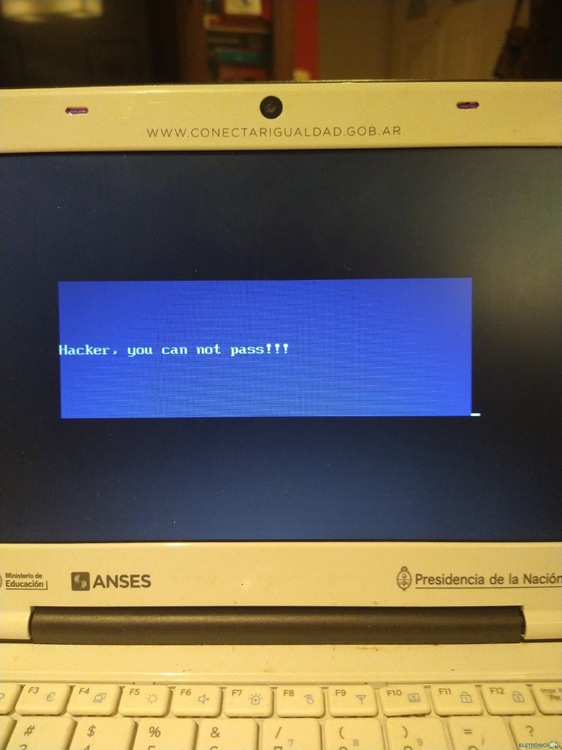
  1. Me pasaron un bin para actualizar la BIOS y se me pone una pantalla azul con un mensaje que queda bloqueada. Alguna sugerencia ? Anexo el mensaje .
  2. mariaserale começou a seguir: Totoparra
  3. Hola , conocí está página buscando información como reparar una BIOS. Mí nivel técnico no estoy bueno, estoy aprendiendo. Espero poder dar algo de lo conocimiento Slds!!!!

Account

Navigation

Pesquisar

Pesquisar

Configure browser push notifications

Chrome (Android)
  1. Tap the lock icon next to the address bar.
  2. Tap Permissions → Notifications.
  3. Adjust your preference.
Chrome (Desktop)
  1. Click the padlock icon in the address bar.
  2. Select Site settings.
  3. Find Notifications and adjust your preference.