Ir para conteúdo
View in the app

A better way to browse. Learn more.

EletrônicaBR.com

A full-screen app on your home screen with push notifications, badges and more.

To install this app on iOS and iPadOS
  1. Tap the Share icon in Safari
  2. Scroll the menu and tap Add to Home Screen.
  3. Tap Add in the top-right corner.
To install this app on Android
  1. Tap the 3-dot menu (⋮) in the top-right corner of the browser.
  2. Tap Add to Home screen or Install app.
  3. Confirm by tapping Install.

RicardoCouto9

Membros
  • Registrado em

  • Última visita

  • Créditos EBR

    1
  1. @Átomos pode ser mais especifico? eu tentei procurar por essa referencia e não encontrei. Saquei um DATABook SMD (http://www.laptopserviz.bg/media/wysiwyg/SMD_semiconductor_codes_-_2012.pdf) e não consegui. Pode me dar uma dica explicita para me ajudar numa próxima vez? Obrigado
  2. @Átomos consegue me explicar como conseguiu chegar lá? como sabe que é esse ? Obrigado pela sua atenção
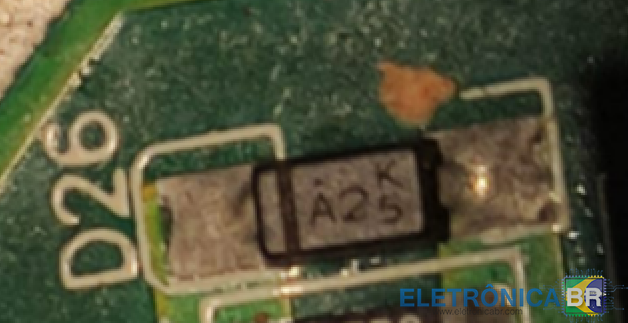
  3. Bom dia, URGENTE: não consigo descobrir as características e referência deste diodo. alguém consegue ajudar?

Account

Navigation

Pesquisar

Pesquisar

Configure browser push notifications

Chrome (Android)
  1. Tap the lock icon next to the address bar.
  2. Tap Permissions → Notifications.
  3. Adjust your preference.
Chrome (Desktop)
  1. Click the padlock icon in the address bar.
  2. Select Site settings.
  3. Find Notifications and adjust your preference.