Ir para conteúdo
View in the app

A better way to browse. Learn more.

EletrônicaBR.com

A full-screen app on your home screen with push notifications, badges and more.

To install this app on iOS and iPadOS
  1. Tap the Share icon in Safari
  2. Scroll the menu and tap Add to Home Screen.
  3. Tap Add in the top-right corner.
To install this app on Android
  1. Tap the 3-dot menu (⋮) in the top-right corner of the browser.
  2. Tap Add to Home screen or Install app.
  3. Confirm by tapping Install.

badu70

Membros
  • Registrado em

  • Última visita

  • Créditos EBR

    0
  1. bom dia, não entendi o que quer que eu poste (backup)
  2. Vou baixar e tentar, mas ainda acho que o problema está na BIOS
  3. Ainda não, não consigo achar a BIOS atualizada, se alguém tiver agradeço
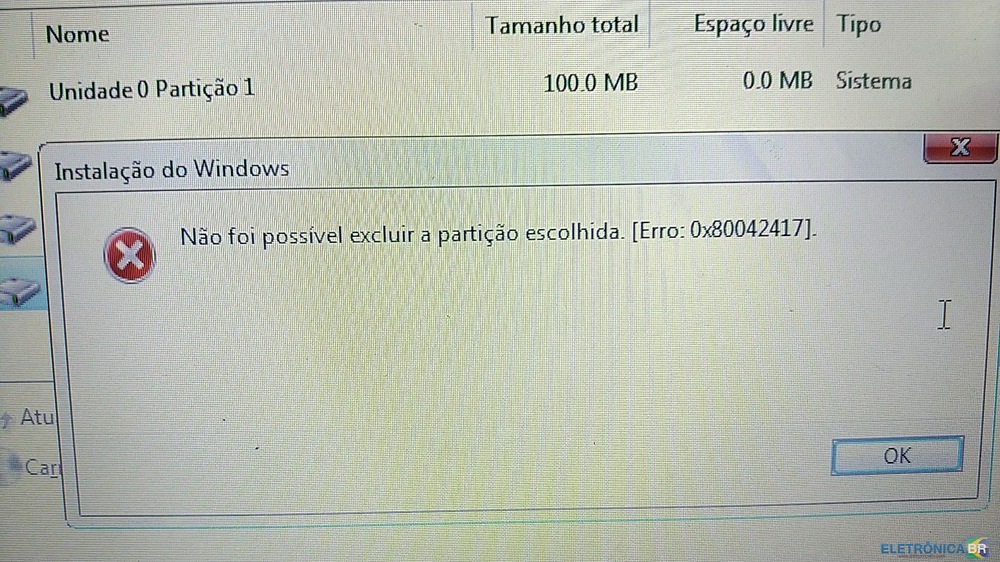
  4. Estou tentando formatar para instalar o windows 10, mas o note não deixa, entra na instalação do Windows normal até a parte que faz formatação, mas quando tento formatar ou excluir qualquer partição dá erro. não consigo tirar a proteção na BIOS, parece que precisa atualizar, já vi alguns posts para tira a proteção na aba Chipset, mas não tem está aba. Se tiveram alguma solução para notebook poderiam me ajudar, agradeço
Account

Navigation

Pesquisar

Pesquisar

Configure browser push notifications

Chrome (Android)
  1. Tap the lock icon next to the address bar.
  2. Tap Permissions → Notifications.
  3. Adjust your preference.
Chrome (Desktop)
  1. Click the padlock icon in the address bar.
  2. Select Site settings.
  3. Find Notifications and adjust your preference.