Ir para conteúdo
View in the app

A better way to browse. Learn more.

EletrônicaBR.com

A full-screen app on your home screen with push notifications, badges and more.

To install this app on iOS and iPadOS
  1. Tap the Share icon in Safari
  2. Scroll the menu and tap Add to Home Screen.
  3. Tap Add in the top-right corner.
To install this app on Android
  1. Tap the 3-dot menu (⋮) in the top-right corner of the browser.
  2. Tap Add to Home screen or Install app.
  3. Confirm by tapping Install.

Sandro-info

Membros
  • Registrado em

  • Última visita

  • Créditos EBR

    0
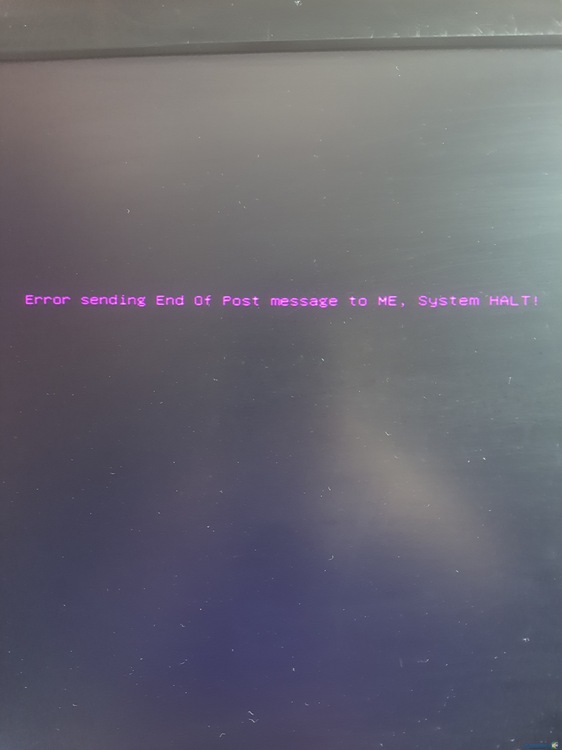
  1. Olá amigos e companheiros, estou com problemas em meu mini Pc. Algo surreal... Uma frase que apareceu em meu único Pczinho... E agora não consigo ligar ele. Eu uso para estudar e jogar Mario World kkk mais enfim. Preciso muito da BIOS dele, se alguém conseguir me ajudar, é o modelo postech 232 2227... Vi aqui no fórum que tem o download dele, porém eu não consigo baixar. Por favor, alguém consegue me ajudar ? Desde já agradeço imensamente... Não tenho dinheiro pra mandar consertar meu Pc. (Essa mensagem do print começou a apresentar após algumas configurações que futuquei na BIOS... Já resetei a BIOS, já deixei sem bateria e desligada na tomada a mais de 24 horas e nada resolve.
Account

Navigation

Pesquisar

Pesquisar

Configure browser push notifications

Chrome (Android)
  1. Tap the lock icon next to the address bar.
  2. Tap Permissions → Notifications.
  3. Adjust your preference.
Chrome (Desktop)
  1. Click the padlock icon in the address bar.
  2. Select Site settings.
  3. Find Notifications and adjust your preference.