Ir para conteúdo
View in the app

A better way to browse. Learn more.

EletrônicaBR.com

A full-screen app on your home screen with push notifications, badges and more.

To install this app on iOS and iPadOS
  1. Tap the Share icon in Safari
  2. Scroll the menu and tap Add to Home Screen.
  3. Tap Add in the top-right corner.
To install this app on Android
  1. Tap the 3-dot menu (⋮) in the top-right corner of the browser.
  2. Tap Add to Home screen or Install app.
  3. Confirm by tapping Install.

Daniel Birmann

Membros
  • Registrado em

  • Última visita

  • Créditos EBR

    1
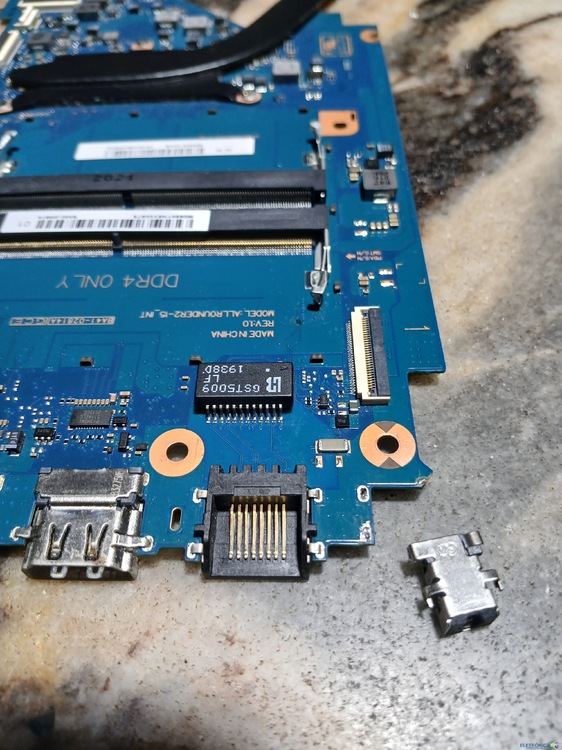
  1. Eu vou tentar ligar ali então, no meu caso ta tudo funcionando só que não consigo carregar a bateria pq quebrou aquela aste igual no seu caso ai tava quebrando a cabeça tentando achar essa trilha. Vou checar ali. Vlw mesmo obrigado. Depois respondo aqui se funcionou.
  2. Eu tenho essa placa é meu notebookacobteceu exatamente o mesmo problema e estou quebrando a cabeça aqui também para entender onde vai o pino positivo desse jack e nao achei trilha a central.
  3. Conheci voces pelo google, sou estudante de eletrônica e amador robista.

Account

Navigation

Pesquisar

Pesquisar

Configure browser push notifications

Chrome (Android)
  1. Tap the lock icon next to the address bar.
  2. Tap Permissions → Notifications.
  3. Adjust your preference.
Chrome (Desktop)
  1. Click the padlock icon in the address bar.
  2. Select Site settings.
  3. Find Notifications and adjust your preference.