


Raydel87
Membros
-
Registrado em
-
Última visita
-
Créditos EBR
71
-
1. Google 2. Engenheiro Eletrônico 3. Depuração de placas-mãe de computadores pessoais. Reparação de fontes de alimentação de modo comutado. 4. Trabalho reparando computadores pessoais. Eu amo eletrônica.
-
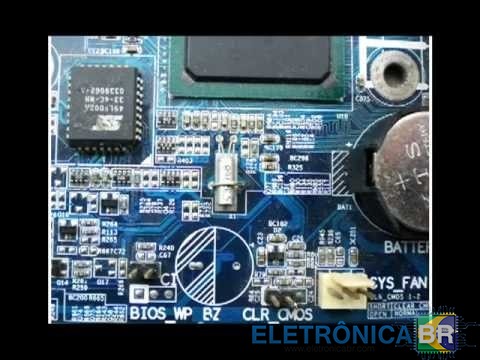
Quando você pressiona o botão liga / desliga no painel frontal da sua desktop board e nada acontece, uma das coisas que você deve verificar é o circuito do oscilador RTC. Se esse circuito não estiver funcionando corretamente, o chipset não desrespeita o sinal SLP_S3 # e o computador não liga. Uma maneira fácil de verificar isso é pressionar o botão liga / desliga do painel frontal e tocar nos pinos de cristal de 32.768 khz com um dedo. A eletrostática no seu dedo induzirá pulsos de clock no oscilador Pierce dentro do chipset e a placa será ligada. Cuidado para não acumular muita eletrostática nos dedos; você também pode usar um multímetro na escala de ohm, em vez do dedo. Se esse truque funcionar na placa morta, significa que o circuito do relógio RTC está com defeito. Você pode tentar substituir o cristal, os resistores de 10Mohms ou usar um IC externo do oscilador de clock de 32.768 khz. Espero que ajude alguém.
-
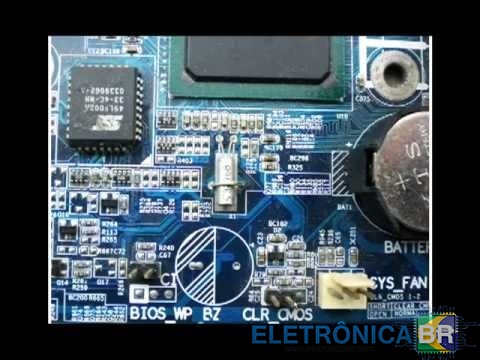
When you press the power button on the front panel of your desktop board and nothing happens, one of the things you should check is the RTC oscillator circuit. If this circuit is not working properly the chipset won’t de-assert SLP_S3# signal and the computer won’t turn on. One easy way to check this is to press the front panel power button and then touch the 32.768 khz crystal pins with one finger. The electrostatic on your finger will induce clock pulses on the Pierce oscillator inside the chipset and the board will turn on. Be careful of not having too much electrostatic build up on your fingers; you could also a multi-meter on the ohm scale instead of your finger. If this trick works on your dead board, it means the RTC clock circuit is faulty. You could try replace the crystal, the 10Mohms resistors, or use an external 32.768 khz clock oscillator IC. Hope it helps someone.
-
thanks

