Ir para conteúdo
View in the app

A better way to browse. Learn more.

EletrônicaBR.com

A full-screen app on your home screen with push notifications, badges and more.

To install this app on iOS and iPadOS
  1. Tap the Share icon in Safari
  2. Scroll the menu and tap Add to Home Screen.
  3. Tap Add in the top-right corner.
To install this app on Android
  1. Tap the 3-dot menu (⋮) in the top-right corner of the browser.
  2. Tap Add to Home screen or Install app.
  3. Confirm by tapping Install.

renanwolff

Membros
  • Registrado em

  • Última visita

  • Créditos EBR

    13
  1. Alguns XELL não tem parte gráfica, fica difícil de saber se subiu o glitch ou não. Um negócio que sempre faço é ligar o cabo de rede no xbox enquanto ele tá tentando subir o xell e fico verificando se o meu roteador distribuiu IP pra mais algum dispositivo. Se sim, abro o navegador e digito o IP que desconfio ser o do XELL pra ver se é ele mesmo. É até mais fácil pra pegar DVD e CPU KEY, fusesets e tal
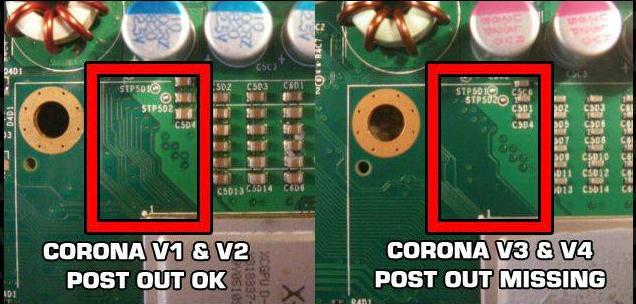
  2. Boa! Esse guiazinho é sempre útil. Também sempre indico esse, pra verificar a necessidade do post fix.
Account

Navigation

Pesquisar

Pesquisar

Configure browser push notifications

Chrome (Android)
  1. Tap the lock icon next to the address bar.
  2. Tap Permissions → Notifications.
  3. Adjust your preference.
Chrome (Desktop)
  1. Click the padlock icon in the address bar.
  2. Select Site settings.
  3. Find Notifications and adjust your preference.