Ir para conteúdo
View in the app

A better way to browse. Learn more.

EletrônicaBR.com

A full-screen app on your home screen with push notifications, badges and more.

To install this app on iOS and iPadOS
  1. Tap the Share icon in Safari
  2. Scroll the menu and tap Add to Home Screen.
  3. Tap Add in the top-right corner.
To install this app on Android
  1. Tap the 3-dot menu (⋮) in the top-right corner of the browser.
  2. Tap Add to Home screen or Install app.
  3. Confirm by tapping Install.

thiagomartucelli

Membros
  • Registrado em

  • Última visita

  • Créditos EBR

    0
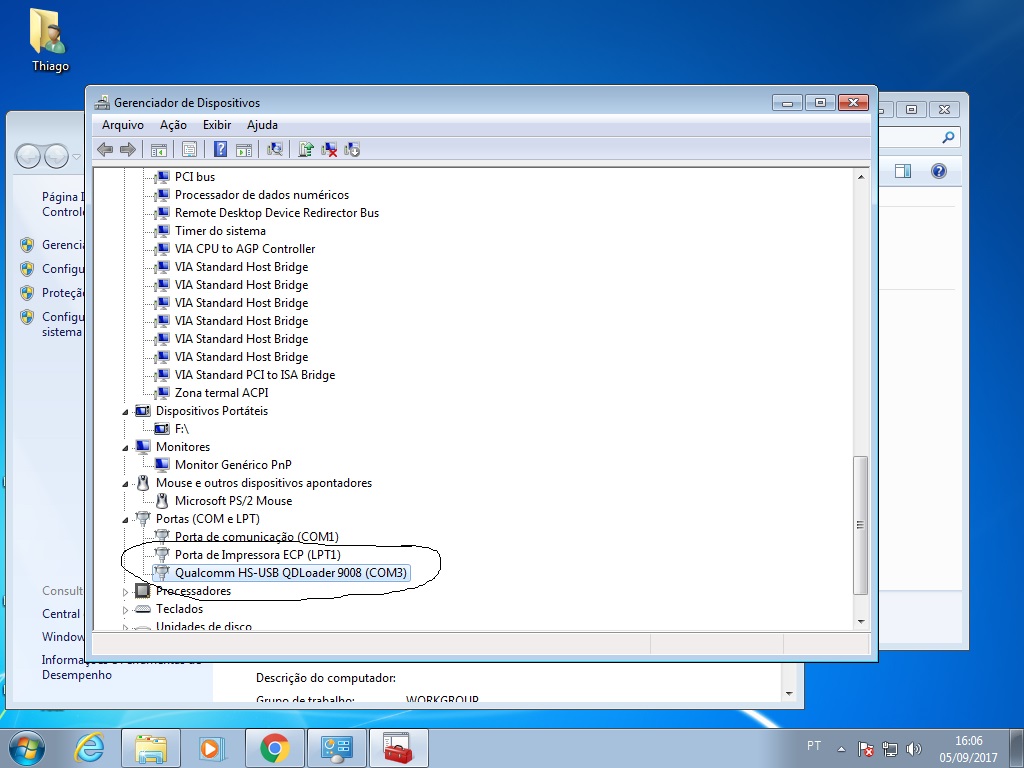
  1. consegui mais windows so reconhece na porta com 3 conforme a imagem em anexo. como posso fazer pra recuperar o bootlooder ?
  2. boa tarde fiz a substituiçao do conector tentei em outros pcs e notebooks cabos diferente e nada...
  3. ola fiz procedimento correto porem aparelho nao ¨liga¨mais , nao da imagen se eu tento ligar ele com cabo usb conectado windows da erro de usb, tem alguma solucao
  4. OLÁ ESTOU COM LG D175F FOI FEITO PROCEDIMENTO DE REISTALAÇÃO DE BOOTLOODER POREM NAO SEI O Q HOUVE O CELULAR AGORA NAO LIGA MAIS NAO DA TELA, QNDO VOCE CONECTA O CABO USB NO PC ELE ATE RECONHECE MAIS FALA QUE USB ESTA COM ERRO. O QUE PODE SER FEITO NESSE CASO ULTIMO PROCEDIMENTO FEITO ANTES DO PROBLEMA FOI FORMATACAO PELO PROGRAMA Hard Disk Low Level Format Tool
Account

Navigation

Pesquisar

Pesquisar

Configure browser push notifications

Chrome (Android)
  1. Tap the lock icon next to the address bar.
  2. Tap Permissions → Notifications.
  3. Adjust your preference.
Chrome (Desktop)
  1. Click the padlock icon in the address bar.
  2. Select Site settings.
  3. Find Notifications and adjust your preference.