


Marcelo R. Dionizio
Membros
-
Registrado em
-
Última visita
-
Créditos EBR
0
-
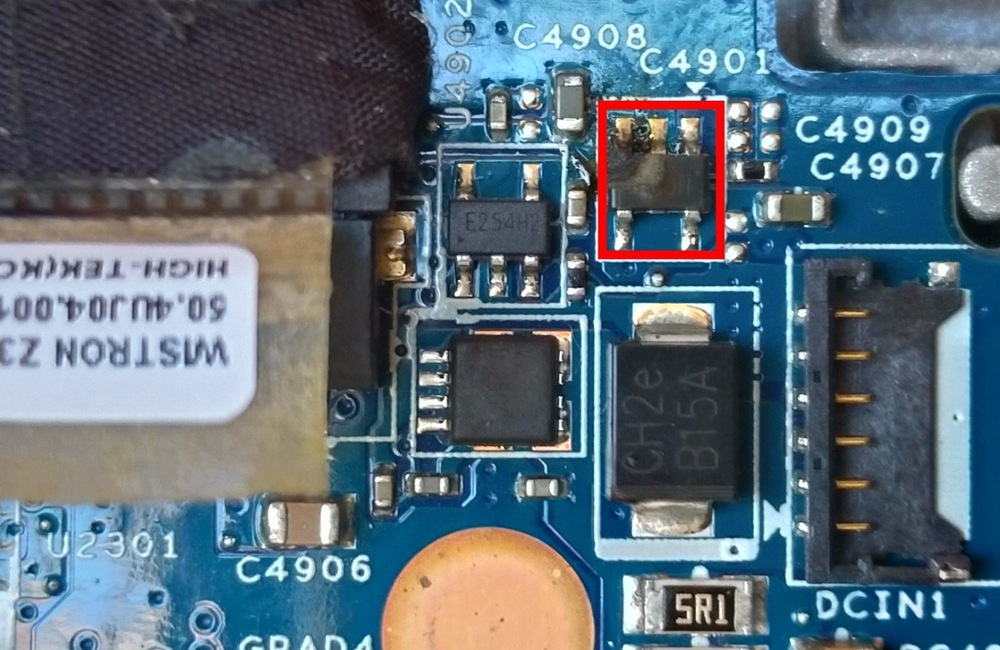
Solicito a gentileza dos companheiros que tiverem essa placa para identificar o componente em destaque na imagem. A placa é: SONY VAIO SVT131A11L PLACA MÃE SÉRIE: MBX-265 S1206-1 Z30UL MB 48.4UJ01.011
-
Marcelo R. Dionizio respondeu o tópico de Marcelo R. Dionizio em Pedidos de Esquemas e BIOS (Notebooks)SONY VAIO SVT131A11L PLACA MÃE SÉRIE: MBX-265 S1206-1 Z30UL MB 48.4UJ01.011 Caso alguem tenha essa placa e puder me dizer o valor dessa peça que entrou em curto, pq o esquema está difícil de conseguir.

-
Preciso do esquema da placa mãe: Sony Vaio SVT131A11L MBX-265 S1206-1 Z30UL MB 48.4UJ01.011
-
Eu Conheci o site através do google. O meu nível é básico. Eu pretendo aprender mais sobre circuitos eletrônicos. Desde a adolescência que eu gosto de fuçar em circuitos. Aprendi quase tudo mexendo mesmo.


