Ir para conteúdo
View in the app

A better way to browse. Learn more.

EletrônicaBR.com

A full-screen app on your home screen with push notifications, badges and more.

To install this app on iOS and iPadOS
  1. Tap the Share icon in Safari
  2. Scroll the menu and tap Add to Home Screen.
  3. Tap Add in the top-right corner.
To install this app on Android
  1. Tap the 3-dot menu (⋮) in the top-right corner of the browser.
  2. Tap Add to Home screen or Install app.
  3. Confirm by tapping Install.

ThalysonMoreira

Membros
  • Registrado em

  • Última visita

  • Créditos EBR

    0
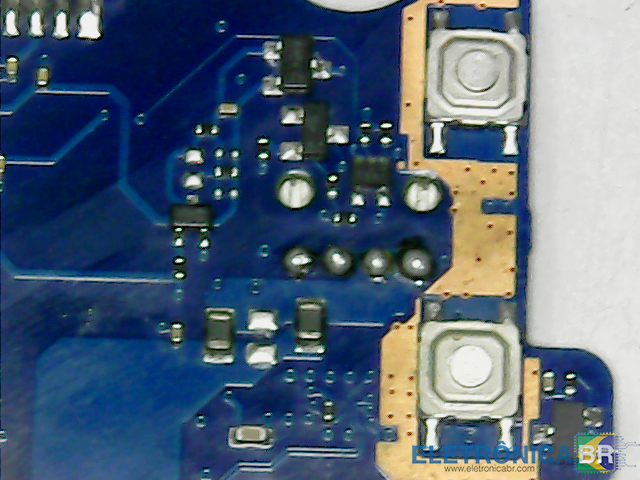
  1. oi tenho um notebook samsung modelo np500p4c-ad1br, defeito sem brilho devido um curto no transitor e está queimado todo torrado. Queria saber qual é esse transitor que fica perto do conector ou do botao e a pinagem do conector lvds na placa e super I/O tambem, caso eu queria fazer um jumper para isso. nao foi possivel tira uma foto, mais lembro que vi aqui no forum.
  2. @salmir qual e o pino que acende os leds da tela na placa mae? tenho mesmo defeito, mas queria fazer um jumper para ligar os leds.

Account

Navigation

Pesquisar

Pesquisar

Configure browser push notifications

Chrome (Android)
  1. Tap the lock icon next to the address bar.
  2. Tap Permissions → Notifications.
  3. Adjust your preference.
Chrome (Desktop)
  1. Click the padlock icon in the address bar.
  2. Select Site settings.
  3. Find Notifications and adjust your preference.