Ir para conteúdo
View in the app

A better way to browse. Learn more.

EletrônicaBR.com

A full-screen app on your home screen with push notifications, badges and more.

To install this app on iOS and iPadOS
  1. Tap the Share icon in Safari
  2. Scroll the menu and tap Add to Home Screen.
  3. Tap Add in the top-right corner.
To install this app on Android
  1. Tap the 3-dot menu (⋮) in the top-right corner of the browser.
  2. Tap Add to Home screen or Install app.
  3. Confirm by tapping Install.

bleachnote

Membros
  • Registrado em

  • Última visita

  • Créditos EBR

    1
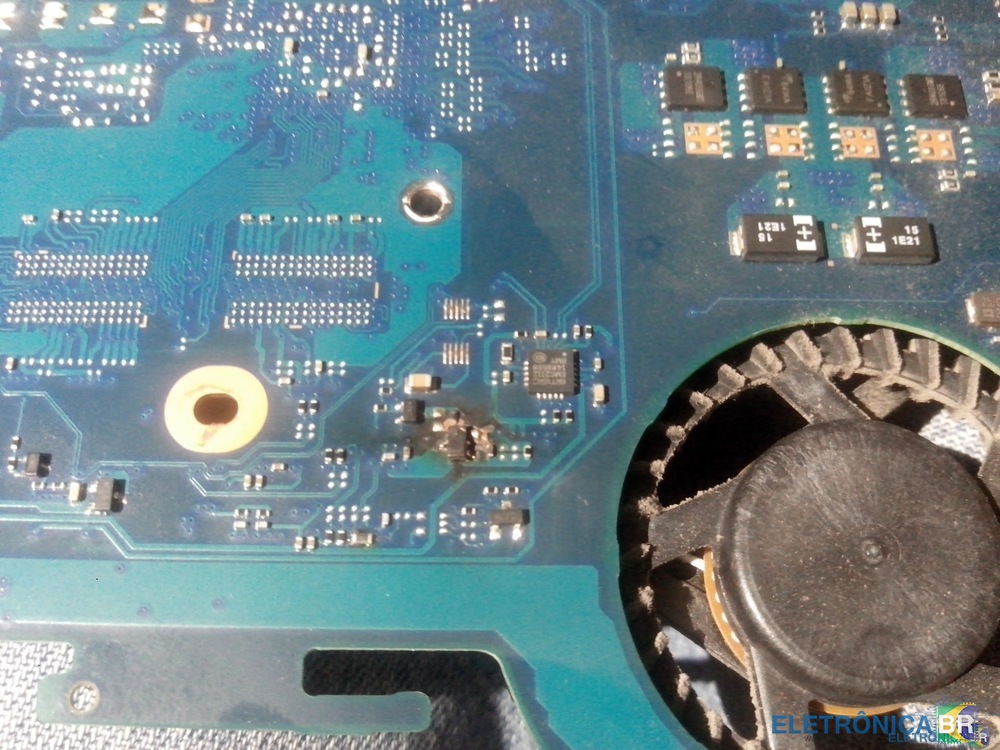
  1. Olá, to com um problema com um notebook resolvi abrir o notebook, encontrei um transistor queimado, só que não consigo indentificar qual o transistor por estar totalmente danificado. Se alguém souber e poder me dizer , ficarei muito agradecido. Segue as especificações do notebook: Samsung NP RV411 CD1BR placa-mãe: Pcb code: BA41-01881A Model: SCALA2-14UL-VE REV: 1.0
  2. conheci eletronicabr por pesquisas no google ,sou amador (fução) e gosto de eletronica . Gostei do site que por meio de moderadores e galera geral já tirei muitas duvidas .Só agradeço o conhecimento recebido.


Account

Navigation

Pesquisar

Pesquisar

Configure browser push notifications

Chrome (Android)
  1. Tap the lock icon next to the address bar.
  2. Tap Permissions → Notifications.
  3. Adjust your preference.
Chrome (Desktop)
  1. Click the padlock icon in the address bar.
  2. Select Site settings.
  3. Find Notifications and adjust your preference.