
Ir para conteúdo
View in the app

A better way to browse. Learn more.

EletrônicaBR.com

A full-screen app on your home screen with push notifications, badges and more.

To install this app on iOS and iPadOS
  1. Tap the Share icon in Safari
  2. Scroll the menu and tap Add to Home Screen.
  3. Tap Add in the top-right corner.
To install this app on Android
  1. Tap the 3-dot menu (⋮) in the top-right corner of the browser.
  2. Tap Add to Home screen or Install app.
  3. Confirm by tapping Install.

marcelosofth

Membros
  • Registrado em

  • Última visita

  • Créditos EBR

    0
  1. Olá amigos, meu Notebook Dell Vostro 1510 deu problema no Inverter LCD, daí a imagem aparece só no reflexo pois não tem a iluminação da tela! Obs.: Tem como consertar o inverter ou só comprando um novo? Modelo: 001VA 94V-0, DEPOIS MAIS ESSA NUMERAÇÃO: E198444, DEPOIS NO VERSO DIZ: 6001720L-B, POR FIM: E131735 - YNV-C03
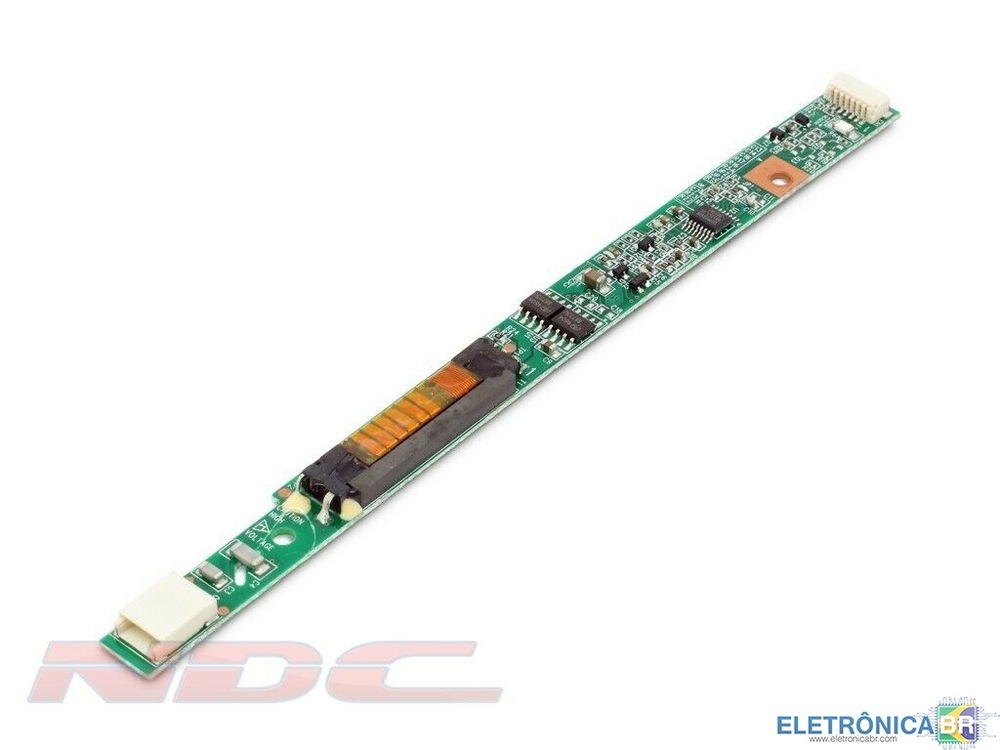
  2. Olá amigos, meu Notebook Dell Vostro 1510 não acende mais o Led da tela, dá para ver a imagem de fundo no reflexo, alguém pode me dar uma "Luz" neste probleminha? Obs.: Vi por ai que alguns fazem um jump num pino de 3.3v para uma determinada perna no conector do cabo que vai pra tela, porém o meu modelo 1510 é diferente, então o esquema é outro Valeuuuu!

Account

Navigation

Pesquisar

Pesquisar

Configure browser push notifications

Chrome (Android)
  1. Tap the lock icon next to the address bar.
  2. Tap Permissions → Notifications.
  3. Adjust your preference.
Chrome (Desktop)
  1. Click the padlock icon in the address bar.
  2. Select Site settings.
  3. Find Notifications and adjust your preference.