Ir para conteúdo
View in the app

A better way to browse. Learn more.

EletrônicaBR.com

A full-screen app on your home screen with push notifications, badges and more.

To install this app on iOS and iPadOS
  1. Tap the Share icon in Safari
  2. Scroll the menu and tap Add to Home Screen.
  3. Tap Add in the top-right corner.
To install this app on Android
  1. Tap the 3-dot menu (⋮) in the top-right corner of the browser.
  2. Tap Add to Home screen or Install app.
  3. Confirm by tapping Install.

tshopbr

Membros
  • Registrado em

  • Última visita

  • Créditos EBR

    0
  1. Desabilite Wake-On-Lan e Restore On AC Power Loss na BIOS além das opções de acordar com mouse/keyboard e entrega de 5V USB quando em StandBy. Desabilite Fast Boot na BIOS e no Painel de Controle (Mostrar configurações não disponíveis). Desabilite suspensão e inicialização rápida.
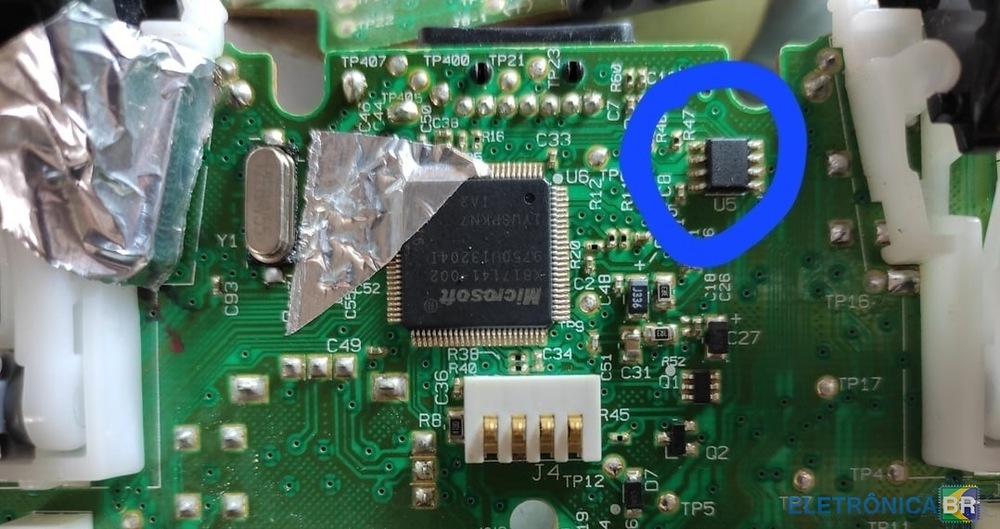
  2. Dica pra quem tem controle de Xbox 360 sem fio que liga mas não sincroniza. Substitua o CI U5 conforme imagem em anexo. Recomendo usar solda low melt em vez de ar quente para não derreter os plásticos ao redor.
Account

Navigation

Pesquisar

Pesquisar

Configure browser push notifications

Chrome (Android)
  1. Tap the lock icon next to the address bar.
  2. Tap Permissions → Notifications.
  3. Adjust your preference.
Chrome (Desktop)
  1. Click the padlock icon in the address bar.
  2. Select Site settings.
  3. Find Notifications and adjust your preference.