erivaldofreitas
Membros
-
Registrado em
-
Última visita
-
Créditos EBR
4
-
 Arquivo de BIOS para o notebook ASUS VivoBook 15 X513EP. Este arquivo é destinado a procedimentos de reparo de placa-mãe via regravação de memória SPI Flash. Características técnicas: Equipamento: Notebook ASUS VivoBook 15 (Série X513EP).Conteúdo do pacote: Arquivo de dump (.bin) com 16,00 MB.Finalidade: Recuperação de placa-mãe com falhas de inicialização, corrupção de firmware ou travamentos.Conteúdo do pacote: X513EP-F1.bin | 16,00 MBCuidados de compatibilidade: Antes de realizar a regravação, certifique-se de que o modelo do notebook e a revisão da placa-mãe coincidem com o equipamento em bancada.Obrigatório: Realize sempre o backup do arquivo original da memória flash antes de gravar o novo arquivo, para garantir a possibilidade de reversão caso necessário.Verifique se o tamanho do chip de memória flash corresponde ao tamanho do arquivo disponibilizado (16 MB).Trabalhe com o equipamento desligado e descarregue capacitores da fonte primária antes de qualquer intervenção física na placa.Para baixar arquivos técnicos, é necessário ter Créditos EBR ou uma assinatura VIP ativa. Caso possua 10 Créditos EBR ou mais, você pode adquirir a assinatura Download 1 na Loja do fórum para liberar downloads diários. NÃO ESQUEÇA!⇩Por favor, após fazer o download e constatar o correto funcionamento da BIOS, não esqueça de deixar um comentário/avaliação na página do download.✓Esta simples ação ajuda a manter arquivos funcionais no Gerenciador.⚠Sem um feedback, amanhã você poderá estar baixando um arquivo incompatível.Free
 -
ASUS VivoBook 15 X513EP Arquivo testado 100% em X513EP-EJ230T i7-1165g7 Informações do Arquivo Uploader erivaldofreitas Enviado 27/07/2023 Categoria Asus Arquivo disponível no Gerenciador de Downloads Abra a página do arquivo para clicar em Download, conferir detalhes, versões, comentários e avaliações. Abrir página do download

-
 BIOS testada na MACHINIST E5-MR9A PRO (detalhes verdes), funcionou 100%
 -
-
-
-
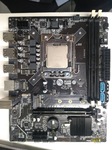 Funcionou perfeitamente na MACHINIST E5-V309 com DDR3 comum e de servidor.
 -
Na mosca! Piscava 4x laranja e 1x branco, esse arquivo resolveu o problema. Obg amigo.
- 2 comentários
- 1 análise
-
-

- 1
-
-
NANO PC A170B REV 4 HSO18GOHL62PB0X Acessar página de download Bios testada ok Uploader erivaldofreitas Enviado 18-10-2022 Categoria Outros
-
Bios testada okFree
-
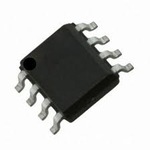 O notebook não ligava, apresentando apenas 5v e 3v, após progravar o EC com esse arquivo, voltou a ligar normalmente Obrigado.
 -
-
Acessar página de download POSITIVO MOTION PLUS Q464B EM_H8316_78B_V10 OPST COPIADA DE NOTEBOOK , FUNCIONANDO PERFEITAMENTE. FOTOS REAIS DA PLACA ACIMA. Uploader erivaldofreitas Enviado 07-01-2022 Categoria Positivo
-
-