Ir para conteúdo
View in the app

A better way to browse. Learn more.

EletrônicaBR.com

A full-screen app on your home screen with push notifications, badges and more.

To install this app on iOS and iPadOS
  1. Tap the Share icon in Safari
  2. Scroll the menu and tap Add to Home Screen.
  3. Tap Add in the top-right corner.
To install this app on Android
  1. Tap the 3-dot menu (⋮) in the top-right corner of the browser.
  2. Tap Add to Home screen or Install app.
  3. Confirm by tapping Install.

BEZERRA DESING

Membros
  • Registrado em

  • Última visita

  • Créditos EBR

    0
  1. ESTOU COM PROBLEMA PARA ACHAR BIOS IPMH110G JÁ PROCUREI POR TODOS OS LUGARES E NÃO ACHEI ALGUME PODE ME AJUDAR
  2. 1. Conheci pelo Google 2. Amador 3. Em informática 4. Sou curioso e tenho vontade de aprender
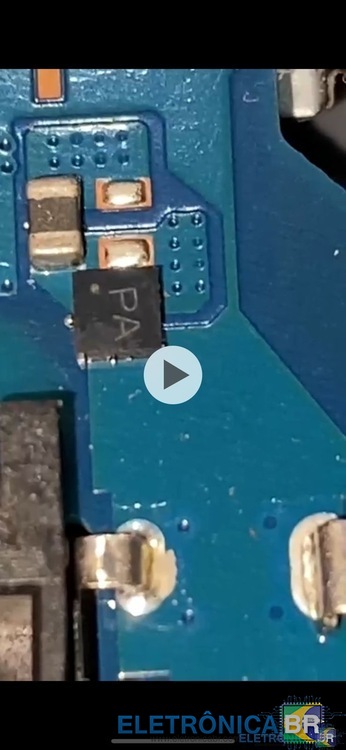
  3. alguem poderia me ajudar a identificar qual componente é esse ai que tem escrito PA que não consegui pois não achei esquema da placa essas fotos consegui de uma placa similar aqui na net
  4. alguem me ajuda por favor estou tentando identificar qual componente é esse com a escrita PA https://photos.app.goo.gl/YVEgvhi8jgL3muXy7
  5. BEZERRA DESING se registrou na comunidade
  6. https://photos.app.goo.gl/YVEgvhi8jgL3muXy7 ALGUEM PODERIA ME AJUDAR REFERENTE A ESSA PLACA ESTOU COM UMA AQUI E NÃO SEI QUAL COMPONENTE TA FALTANDO ACHEI UMA FOTO EM UM VIDEO E NÃO SEI DIZER QUAL COMPONENTE É ESSE QUE TEM PA ESCRITO NA ENTRADA DA FONTE

Account

Navigation

Pesquisar

Pesquisar

Configure browser push notifications

Chrome (Android)
  1. Tap the lock icon next to the address bar.
  2. Tap Permissions → Notifications.
  3. Adjust your preference.
Chrome (Desktop)
  1. Click the padlock icon in the address bar.
  2. Select Site settings.
  3. Find Notifications and adjust your preference.