


Vijay Arockia Raj Vijay
-
Posts Por Dia
0.1 -
Posts
327 -
Registrado em
-
Última visita
-
Vitórias
4 -
Créditos EBR
1,685 [ Doar ]
Tipo de Conteúdo
Fórum
Downloads
Blogs
Galeria
Assinaturas
Calendário
Tudo que Vijay Arockia Raj Vijay publicou
-

resolvido Apple iMac 21.5" 2009 A1311 - placa 820-2784-A - liga e desliga aleatoriamente
Vijay Arockia Raj Vijay respondeu o tópico de Roberto275803 em Casos resolvidos - Notebooks
yes reheat chips -
Versão 1.0.0
13 downloads
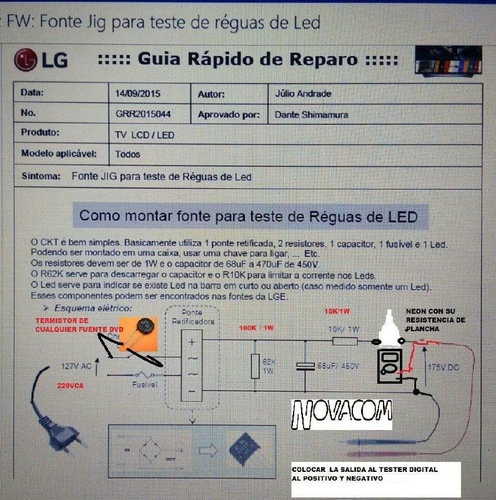
led backlight strip tester -
View File led backlight strip tester led backlight strip tester Submitter Vijay Arockia Raj Vijay Submitted 12/01/2017 Category Montagens, projetos e afins
-
devolvido recuperar partição protegida com bitlocker
Vijay Arockia Raj Vijay respondeu o tópico de edipocunha em Recuperação de Arquivos e Mídias
Recovering BitLocker Volumes: Recovery Keys DiskInternals can recover files and folders from damaged volumes using BitLocker encryption. However, one important pre-requisite must be met. You have to supply the original encryption password or volume Recovery Key generated by BitLocker at the time the protected volume was created. DiskInternals does not, and will not break into protected volumes if the original password or volume recovery key is unknown. This is as much of a policy issue as it is a technological limitation. BitLocker protection is strong enough to sustain many years of brute-force attacks. The password part is simple; if access to your BitLocker volume was protected with a password, simply enter that password into DiskInternals EFS Recovery when prompted, and the recovery will go on seamlessly. Volume Recovery Keys are something else. These keys are returned by BitLocker at the time the encrypted volume is created and if hardware Trusted Platform Module keys, USB keys or combinations of thereof are employed for transparent encryption. A proper Recovery Key may look like this: 528748-036938-506726-199056-621005-314512-037290-524293 If you used a USB key to unlock your BitLocker volume, the Recovery Key (in the format shown above) is stored in a .BEK file with a name that looks like this: 3926293F-E661-4417-A26C-C52286C5F149.BEK Either way, you’ll need a volume Recovery Key to recover information from your BitLocker encrypted volume. The Easy Part Everything else is quite easy. To recover files and folders from the encrypted drive, launch EFS Recovery and enter your volume Recovery Key. If the key matches, the product will automatically scan the BitLocker volume to locate any recoverable files and folders, detecting and fixing file system errors if that option is selected. Everything happens completely automatically; all you need to do is selecting which files to recover. DiskInternals EFS Recovery overcomes limitations of older versions of Windows being unable to natively access BitLocker volumes. You can run DiskInternals EFS Recovery on Windows 2000, XP, 2003 Server, Vista, Windows 7 or 2008 Server, and it will still be able to successfully recover BitLocker 1.0 and 2.0 volumes completely automatically. -
resolvido Reset Epson L355 sem software
Vijay Arockia Raj Vijay respondeu o tópico de Walter V. Junior em Casos resolvidos - Impressoras e Copiadoras
write eeprom -
its not a proplem.
-
resolvido PS3 JSD-001 CECH2512 - não inicia após escrita da Nor com E3 flasher
Vijay Arockia Raj Vijay respondeu o tópico de brtec.eletronica em Casos resolvidos - Vídeo Games
change chip -
devolvido Intelbras i36 | JFW01 LA-3961P REV 2.0 | NÃO LIGA
Vijay Arockia Raj Vijay respondeu o tópico de InfoJconnect em Notebook's
19v adapter & check any resistors burn??? -
Try rebooting. Since I'm fairly certain you've already tried that, try booting into recovery and wiping dalvik cache, then fix permissions. I'm not sure if that'll have any effect, but it's worth a shot. If that doesn't work, backup your sdcard to your computer, then format it in settings. If that doesn't work, try formatting it in recovery. If none of that works, then I'm not sure what else to try other than flashing back to stock and starting fresh. It's a pain to do all that, so exhaust every other option first.
-
Debug Card How do you use the post card in today and how would you test the Motherboard with the code appearing on it? I will tell about Firstly, post cards are placed on the motherboard's PCI slot. Now power the motherboard and do it on the on. Firstly, on the post card, you have to check the status of all the LED lights in the following ways. Not all of the volts and signals are coming right. How To Check Motherboard Using Diagnostic Card Easy Manual in Hindi Debug Card INDICATORS If CLK is the LED on, this means Clock Signal is coming to the board. Clock circuit is not working if or if it is off. This signal will come even if the CPU Socket is not processed. When the BIOS reads the processor BIOS, it remains lead-on if the light does not burn even on the motherboard, then the motherboard, RAM or processor may be defective in the motherboard. This is an onboard IRDY device when you get a ready signal. FRAME PCI Bus Frame Under normal circumstances this light should be on. It has detected a PCI frame signal. RST Reset This light just overlaps the motherboard as long as it remains on for half-a-second seconds and then it is off. If it continues to remain on, the reset signal is not correct or it will not come at all. Used to be. 12V Power Supply, on the basis of this LED, it shows that the board is getting 12v supply. If 12v is not being supplied, then it remains off. -12V Power Supply, when this LED is on, it shows that the board is getting a supply of -12V. If the -12v is not being supplied, then it remains closed. 5 V Power Supply, when this LED is on the oven, it shows that the board is getting supply of 5V. If 5v is not being supplied, then it is off.-5 V Power Supply, when this LED is on, it shows that the board is getting supply of -5v. If the -5v is not being supplied then it is off.33 V3 3.34 power supply in PCI slots of some motherboards. This is an indicator of 3.3V supply in LED motherboard. If all the LED lights are in the correct position then they will see the post code coming on the card display. Post codes can vary in different motherboards. Because it is not necessary that everyone has the same bios of the same company as the post error code is programmed in the bio. Therefore, according to various bios the error code or post code may be different. Here is the main error code coming out here. Award BIOS Error code: 00 (FF) Code Meaning → If this code comes then Post Self Test is not going to be correct in the motherboard. Solution → When the code comes, the motherboard either processor is bad or the processor is not getting the right supply. For this, replace the CPU again or the second. And check the core vault to be correct. If everything is okay then the bios may be bad, programmers can re-bios. Error Code: 01 Code meaning: This code means that there is a problem during the Processor Test. Solution → If the code stops on this code then check all the components related to the processor. Such as FSB on processor voltage, frequency, CPU overlapping. Reset bios by jumper. If everything is fine then the processor is bad, change it. Error code: C1 to C5 Code meaning: When this code comes, there is a problem related to memory self-test. Solution → This code comes when the RAM does not work correctly. Most codes are stopped at this code when the signal is not received correctly. For this, clean the RAM pins and RAM slots and clean the RAM again. (Clean the pins of the RAM with the rubber wiping) or change the RAM to the other. Occasionally this problem occurs even when bios is bad. Error code: 0D Code Meaning: This code comes when the video channel does not pass the testing. solution → Add or change graphics card when this code comes.
-
- 1
-

-
devolvido TV Samsung Un32fh5203g sem imagem não desliga
Vijay Arockia Raj Vijay respondeu o tópico de Lucas Lopo em TVs de PLASMA, LCD, LED e CRT
then backup flash & reset https://eletronicabr.com/files/file/26458-reset-flash-ics/ -
devolvido TV Samsung Un32fh5203g sem imagem não desliga
Vijay Arockia Raj Vijay respondeu o tópico de Lucas Lopo em TVs de PLASMA, LCD, LED e CRT
check mainboard voltages if ok flash firmware -
devolvido Hp Probook 4530s Ramones Mb-a02 Liga acende led branco e laranja e desliga
Vijay Arockia Raj Vijay respondeu o tópico de leaolima em Notebook's
yes you are correct -
devolvido Positivo - pos-ECIG41BS - bios
Vijay Arockia Raj Vijay respondeu o tópico de Geriel Rei Dos Bronze em Motherboards, PCs, All in One & Cia
https://schematic.eletronicabr.com.br/gerenciador-de-arquivos/26/biosbios-placa-mae-positivo-pos-ecig41bs-original-e-do-fabricante-ecs/105732/ -
devolvido Positivo - pos-ECIG41BS - bios
Vijay Arockia Raj Vijay respondeu o tópico de Geriel Rei Dos Bronze em Motherboards, PCs, All in One & Cia
https://schematic.eletronicabr.com.br/gerenciador-de-arquivos/26/biosbios-placa-mae-positivo-pos-ecig41bs-original-e-do-fabricante-ecs/105732/ -
resolvido Sony Vaio SVE14AA12X / MBX-273 V110 H MB / Não liga
Vijay Arockia Raj Vijay respondeu o tópico de André Kirienko em Casos resolvidos - Notebooks
https://www.4shared.com/rar/lNyLu07Xce/Foxconn_V110_H_MB_MBX-273.html -
resolvido Sony Vaio SVE14AA12X / MBX-273 V110 H MB / Não liga
Vijay Arockia Raj Vijay respondeu o tópico de André Kirienko em Casos resolvidos - Notebooks
http://notebookschematic.org/data/NOTEBOOK/attachments/SC/products_files/Sony Vaio VPC-F Series_Foxconn_M931_IRX-5300_MBX-215_RevSA.pdf -
dúvida Xbox 360 Slim - Corona V4 erro 0002
Vijay Arockia Raj Vijay respondeu o tópico de jhonymanson em Vídeo Games
Details for Error code E02/0002 Cold solderjoint under CPU Details Primary Error code: 3 RLOD E-Code / Secondary Error code:E02 (No Audio/Video) / 0002 Binary/Hex:00000010 / 0x02 -> 2 Known fixes: 1) Scan the mainboard and make sure that there is nothing that might short something out, like metal chipping, components, that moved out of place while reflowing, etc. - Especially in the CPU area 3) Replace MOSFETs and regulators that are known to cause it if they were blown 4) Check if the standby voltages are existent, if they are not at a certain area replace the parts in the area which are likely to be defective. 5) Reflow the CPU 6) X-Clamp replacement This error code is caused by a cold solder joint under the CPU or by a problem with the way it is powered(blown mosfet, capacitor or a short) According to xbox-scene it is also a problem with the ethernet chip but there arent any references for that. -
dúvida Caixa Master MU200
Vijay Arockia Raj Vijay respondeu o tópico de Castedo em Aparelhos de Som, GPS, Gadgets e Tecnologia
there is no schematic.try to understand circuit -
resolvido epson l355 placa com defeito
Vijay Arockia Raj Vijay respondeu o tópico de aderito76 em Casos resolvidos - Impressoras e Copiadoras
mosfet nombers??? -
resolvido som cyber 510 nao liga
Vijay Arockia Raj Vijay respondeu o tópico de paulo Rodrigues fernando em Eletrônica Automotiva
remove cover & look for filter capacitors positive -
resolvido Esquema Fonte com Flutuador Relm Chatral RPS12C
Vijay Arockia Raj Vijay respondeu o tópico de Maru em Casos resolvidos - Fontes e NoBreakes
stby ok??? you need to short ps on to gnd to start work -
dúvida Projetor Powerlite S5 com imagem avermelhada
Vijay Arockia Raj Vijay respondeu o tópico de Lucas Valenzuela em Monitores e Projetores
get diagram & compare voltages -
resolvido som cyber 510 nao liga
Vijay Arockia Raj Vijay respondeu o tópico de paulo Rodrigues fernando em Eletrônica Automotiva
connect yellow &red to positive 12v -
resolvido som cyber 510 nao liga
Vijay Arockia Raj Vijay respondeu o tópico de paulo Rodrigues fernando em Eletrônica Automotiva
post photos. red positive 12v black gnd . same colour pairs speakers and some set have standby yellow wire connect to positive 12v
SOBRE O ELETRÔNICABR
Técnico sem o EletrônicaBR não é um técnico completo! Leia Mais...